Meeting user expectations is a significant challenge in software development due to communication gaps between technical and business stakeholders. These misalignments can lead to vague, missing, or incorrect requirements, resulting in lengthy back-and-forth development cycles and increasing project timelines.
Moreover, test case development and execution typically start in the later stages of development. This delay often requires adjustments late in the process, resulting in delays, cost overruns, and software that fails to meet user expectations. According to the International Journal of Industrial Engineering and Management’s “Requirements-Based Testing Process in Practice,” over 50% of defects occur during the requirement phase, and nearly 80% of application rework stems from requirement errors.
Understanding BDD
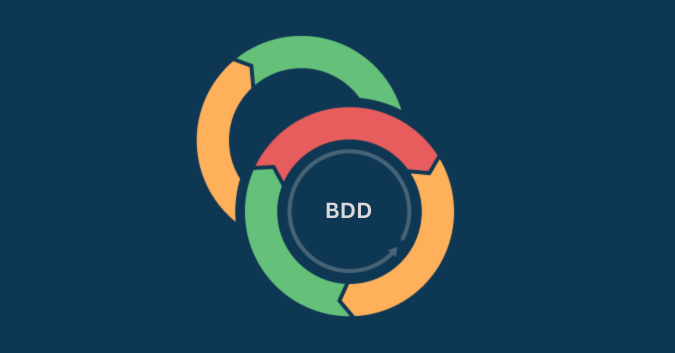
Behavior-driven development (BDD) is an agile software development methodology that signifies a fundamental shift in how software is conceptualized, designed, built, and tested.
Unlike traditional approaches that often concentrate solely on technical specifications, BDD utilizes a more natural language that is comprehensible to technical and non-technical team members.
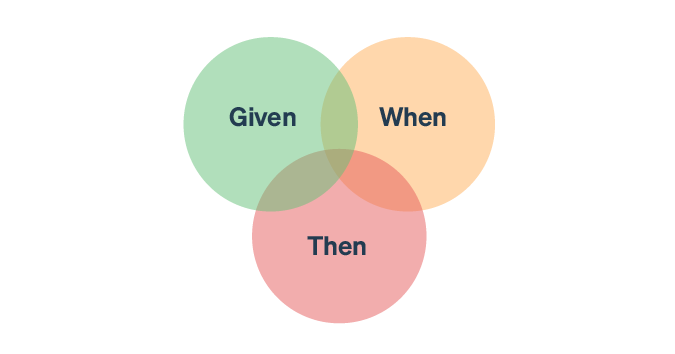
BDD is fundamentally concerned with understanding and defining the expected behavior of a software application from the user’s perspective. It uses the Given-When-Then structure to express how software should behave under specific conditions.
Here’s an example of the Given-When-Then structure applied to a simple scenario:
Given:
- The user is logged into the system.
- The user has items in their shopping cart.
When:
- The user proceeds to checkout and enters their shipping information.
Then:
- The system should calculate the total cost, including shipping fees.
- The system should display the expected delivery date based on the shipping information provided.
- The user should be able to review the order summary before confirming the purchase.
This example illustrates how the Given-When-Then structure clearly and concisely defines a software application’s expected behavior, focusing on specific conditions and outcomes from the user’s perspective.
BDD encourages cross-functional collaboration among developers, testers, business analysts, and stakeholders to ensure consensus on the software’s expected functionality.
Understanding TDD vs BDD
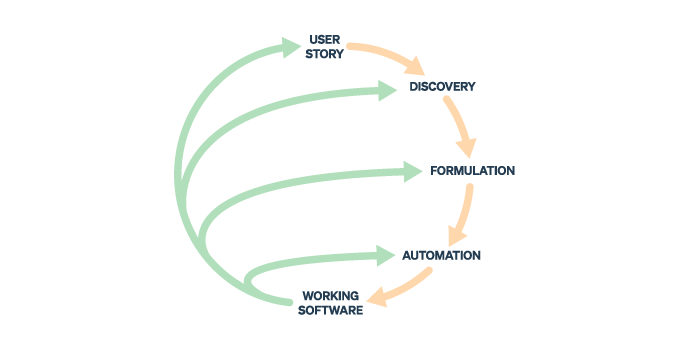
BDD and test-driven development (TDD) are both methodologies that advocate a test-first approach, where tests are written before the actual application code.
However, they differ in their focus and approach, as outlined in the table below:
| Aspect | TDD | BDD |
| Focus | Primarily focuses on unit testing | Focuses on defining behavior from the user’s perspective |
| Language | Uses programming language for test cases | Utilizes natural language for test cases |
| Test structure | Emphasizes test cases based on technical requirements | Utilizes Given-When-Then structure to describe the behavior |
| Stakeholder engagement | Primarily involves developers | Involves developers, testers, business analysts, and stakeholders |
| Tooling | Typically relies on unit testing frameworks | Relies on specialized BDD frameworks such as Cucumber, SpecFlow, etc. |
| Acceptance criteria | Not explicitly defined | Defines acceptance criteria through scenarios |
| Granularity | Focuses on small, isolated units of code | Focuses on higher-level behavior of the system |
| Feedback | Immediate feedback on code functionality | Feedback on behavior and user requirements |
| Iterative development | Drives iterative development cycles | Guides iterative development cycles |
Although BDD and TDD both advocate a test-first approach, TDD prioritizes unit testing, driven by technical requirements and providing immediate feedback on code functionality. Meanwhile, BDD emphasizes defining behavior from the user’s perspective, using natural language for test cases and the Given-When-Then structure.
BDD encourages collaboration to ensure consensus on expected functionality, define acceptance criteria through scenarios, and provide feedback on behavior and user requirements. While TDD is more developer-centric and focuses on technical aspects, BDD promotes broader understanding and collaboration to achieve user-centered outcomes.
Benefits of BDD methodology
Benefits of BDD methodology include:
Enhanced communication and collaboration
BDD promotes clear communication and collaboration across teams by offering a structured approach to specifying requirements. It encourages effective cross-functional collaboration among developers, testers, business analysts, and product owners. This methodology minimizes misunderstandings about user expectations, ensuring everyone aligns with the software’s intended deliverables.
Early and continuous validation
BDD facilitates early and continuous validation of requirements and functionality. By identifying and addressing issues at the development’s inception stage, it reduces the likelihood of major late-stage changes.
Improved documentation
BDD scenarios serve as living documentation that technical and non-technical stakeholders can understand. These scenarios aid in developing a robust, up-to-date reference for the software’s behavior.
“Amigo” perspective
The product owner, developers, and testers collaborate to incorporate the “amigo” perspective into formulating BDD scenarios. With a deep understanding of business and customer needs, the product owner prioritizes and shapes scenarios from a business perspective. Developers contribute their technical insights, assessing the feasibility of implementation that is aligned with business goals. Testers provide a test-centric viewpoint, identifying edge and boundary scenarios crucial for thorough testing. This collaborative effort ensures the development of a high-quality, customer-centric product with minimized rework.
Implementing BDD methodology
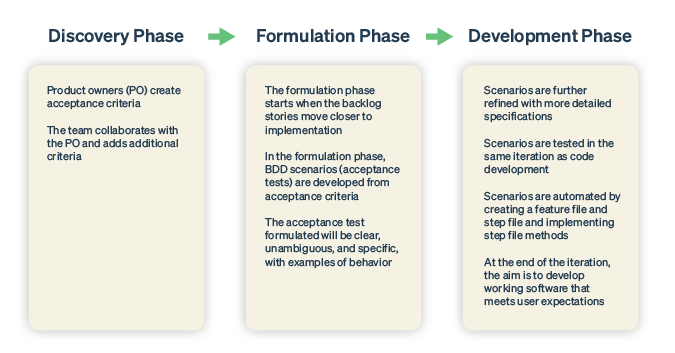
The BDD methodology mainly encompasses three phases:
- Discovery phase
- Formulation phase
- Development phase
In the discovery phase, the product owner sets the acceptance criteria for epics and user stories. Working closely with the agile team, they refine these criteria during backlog grooming and refinement sessions, adding more details as needed. This iterative process ensures that the acceptance criteria are thorough and in line with the team’s understanding of the product requirements.
The formulation phase starts when the backlog stories are close to implementation. The team and product owner work together to create BDD scenarios (acceptance tests) based on acceptance criteria. These BDD scenarios are clear and specific and aim to minimize ambiguity.
During the development phase, as backlog stories progress to iteration, the scenarios undergo further refinement with detailed specifications. These tests are executed and validated within the same iteration.
BDD methodology places significant emphasis on automating BDD scenarios. These scenarios are often automated and can be incorporated into smoke and regression test suites, seamlessly integrated into the CI/CD pipeline. This approach facilitates early issue detection and faster resolutions.
BDD automation implementation
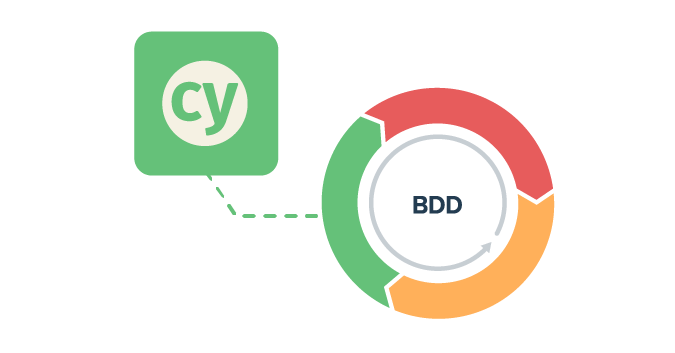
Below are the implementation steps to help you get started with BDD automation:
1. Create a feature file with BDD scenarios
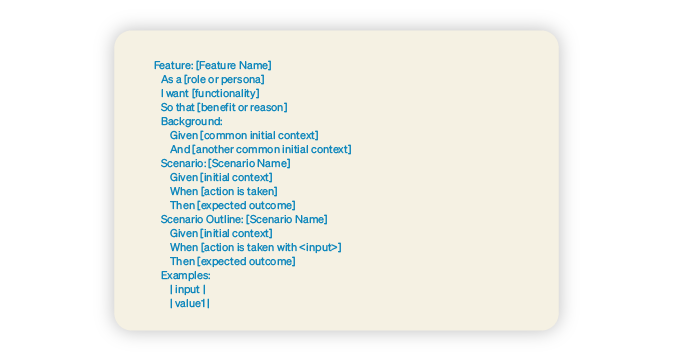
Create a feature file with the various BDD scenarios that validate the system’s desired behavior. A feature file contains a description, background, scenario title, and scenario steps. Below is an example of a simple feature file structure written in Gherkin syntax:
2. Generate a step file for the feature file
Once a feature file is created, a corresponding step file is generated. This step file contains step methods that match the scenario steps defined in the feature file. It serves as the automation script that interacts with the software application to validate its behavior. During execution, each step defined in the feature file is executed in the step file.
3. Implement step definitions
Before implementing the step file, each step is initially generated with a skeleton structure containing pending implementation exceptions, ensuring that the tests fail before implementation. Then, each step method is implemented to interact with the software application. Assertions are added based on scenario validation criteria to validate the behavior of the system.
4. Implement hooks
Implement hooks to execute setup tasks before and teardown tasks after feature and scenario execution. These hooks, defined using @Before and @After annotations, ensure better maintenance, reusability, and consistency in test execution. They help in performing setup and cleanup tasks, enhancing the overall reliability of automated tests.
5. Collaborate on dependencies
Work collaboratively with the development team to identify and address any dependencies when implementing step definitions. This ensures that the automation of BDD scenarios aligns seamlessly with the development implementation, facilitating smoother integration and validation of the software functionality.
6. Execute BDD acceptance tests
After automating BDD scenarios, execute the tests to validate that the software application meets all required acceptance criteria. These tests should pass when the software behaves as expected, ensuring it fulfills the defined scenarios and meets user expectations.
Guidelines for BDD tool selection
When setting up BDD automation for the first time, teams must carefully consider various aspects before selecting a tool to establish an automation framework.
1. Alignment with your technology stack
Choose a tool compatible with your technology stack. Some tools offer support for multiple programming languages, providing flexibility in implementation.

Image: In TestRail, you can create and run BDD scenarios using Gherkin syntax and use this BDD template to simplify test case creation.
2. Multi-level automation support
Select a tool that offers multi-level automation capabilities, covering API and UI test automation. Benefits of multi-level automation capabilities include:
Efficient code reuse
Testers can efficiently reuse utility libraries across different automation levels, reducing code duplication and implementation effort and leading to more maintainable code.
Common shared libraries encompass database-related utilities for connections and query executions, file-handling utilities like JSON and XML serialization/deserialization, reporting utilities, Excel utilities, and test data setup. This practice streamlines development and ensures consistency across various test types.
Unified test framework for streamlined management
Utilizing a unified test framework can streamline test management, reporting, and execution. Consistency in testing tools ensures uniform testing practices, allowing testers to apply similar approaches and reporting mechanisms across both API and UI tests.
By employing a single testing tool for multiple test levels, your team only needs to master one tool, reducing training time and simplifying the onboarding process for new testers. This unified approach fosters collaboration and efficiency within your testing team, leading to smoother workflows and increased productivity.
3. Automation tool alignment
Consider using a BDD tool that matches your current automation tool stack. For example, if you’re using Playwright for automation, Cucumber.js could be a good fit. Likewise, if Cypress is your automation tool, integrating it with Cucumber is straightforward.
Selenium offers various BDD tool options like SpecFlow, allowing flexibility based on project needs and team skills. Aligning BDD and automation tools ensures compatibility and smooth integration, leading to efficient test development and execution.
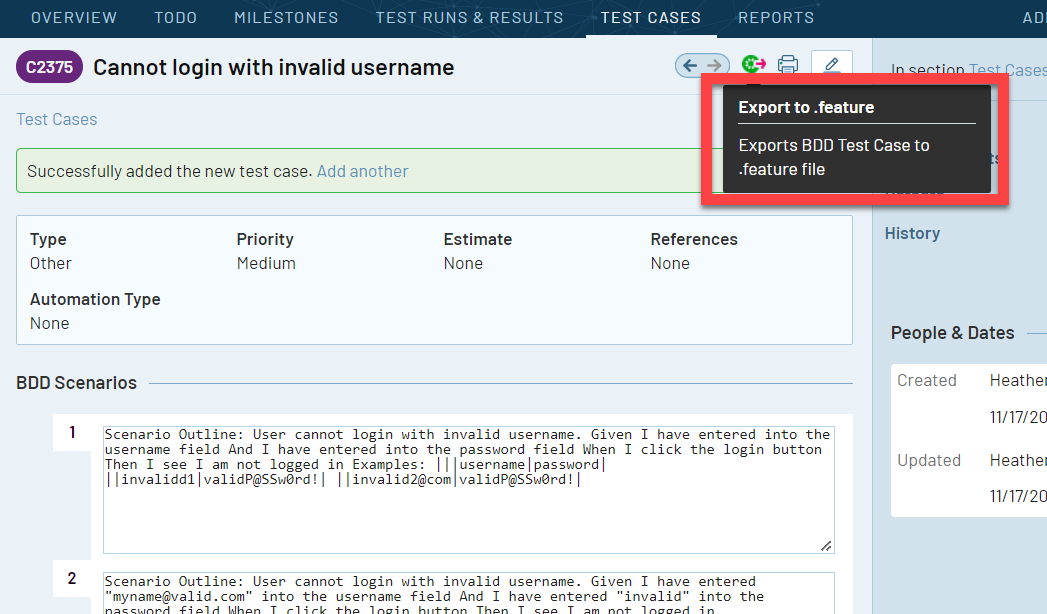
Image: With TestRail, once your BDD scenarios have been created, you can export them directly to use in your desired automation framework.
4. Integration with CI/CD pipeline
Choose a BDD tool that seamlessly integrates with your Continuous Integration/Continuous Deployment (CI/CD) pipeline. Ensure that the chosen BDD tool supports easy integration with various products within the CI/CD ecosystem.
5. Integration with test management tools
It’s essential to choose a BDD tool that supports integration with a test management tool like TestRail for several reasons:
Requirement traceability
Integration with tools like TestRail enables clear mapping between acceptance tests and user stories or requirements, ensuring comprehensive testing and reducing the risk of missed functionalities.
Testing progress visibility
Real-time visibility into testing progress allows test managers and stakeholders to track executed BDD scenarios, their status, and associated defects, aiding in informed decision-making about release readiness and resource allocation.
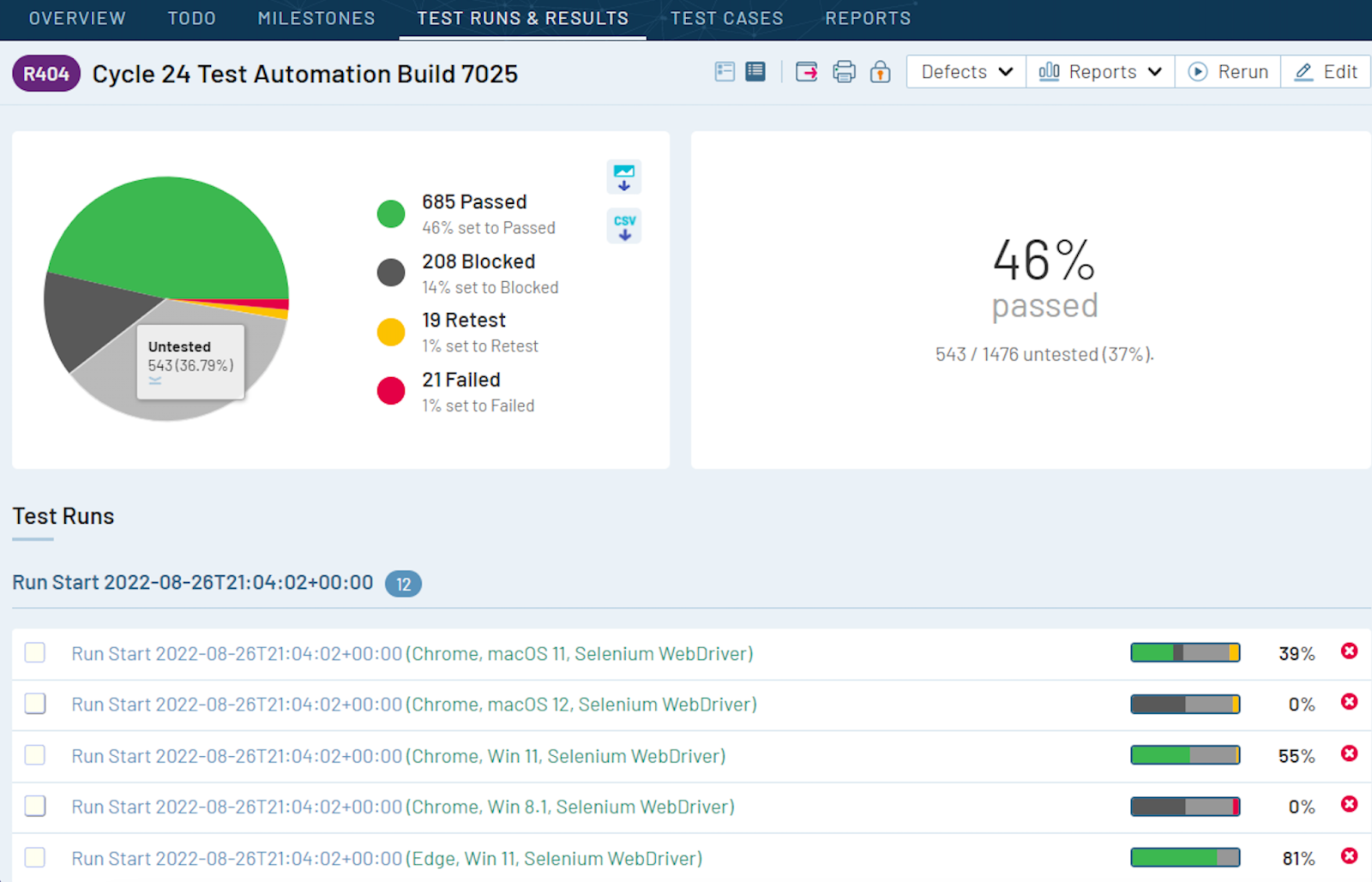
Image: In TestRail, you can triage risks faster by monitoring the progress of all your testing activities in one place.
Centralized test management
Test management tools provide a centralized repository for storing test cases, scenarios, and test results. Integration with a BDD tool allows for seamless synchronization of test artifacts, ensuring that teams are always working with the latest version of test documentation.
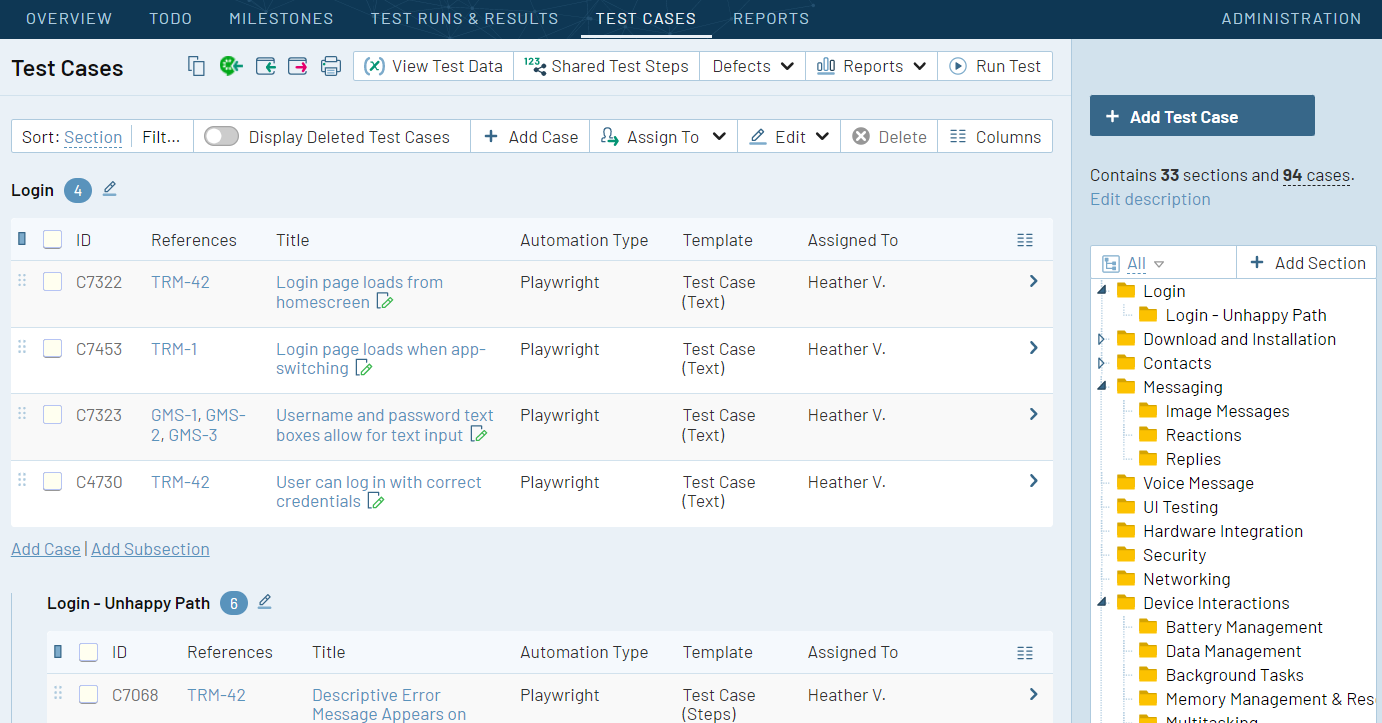
Image: TestRail centralizes your testing activities to make accessing and managing test assets easier, reduce duplication, and ensure consistency across the testing process.
Efficient collaboration
Integration fosters collaboration among team members by providing a unified platform for sharing test-related information, facilitating improved communication and teamwork.
Requirement gap identification
Linking BDD scenarios to user stories or requirements enables quick identification of gaps in test coverage, allowing teams to address missing requirements and refine test scenarios for comprehensive coverage.
6. Community engagement and support
Community engagement and support are crucial for accessing knowledge, resources, and timely assistance when selecting a BDD tool. A strong community fosters knowledge sharing, provides access to resources, and offers timely support through forums and chat platforms.
7. Usability
Usability is essential for ensuring that the BDD tool is easy to adopt, efficient to use, flexible to customize, and accessible to all users. A user-friendly tool streamlines test creation offers clear reporting capabilities and accommodates different skill levels within the team. These factors play a vital role in a BDD tool’s successful adoption and effectiveness.
Best Practices for formulating BDD scenarios
Agile teams can maximize the benefits of BDD by following best practices in BDD scenario writing. These best practices enhance the quality, clarity, and testability of scenarios while standardizing the process. Several key best practices worth highlighting include:
- Clear and concise language: Use clear and concise language to describe scenarios, avoiding ambiguity or confusion.
- Single responsibility principle: Ensure each scenario focuses on a single, specific behavior or outcome, making it easier to understand and maintain.
- Use of Gherkin syntax: Structure scenarios using the Gherkin syntax (Given, When, Then) to ensure consistency and readability.
- Scenario Outline for Data Variations: Use the Scenario Outline for scenarios with multiple data variations, reducing redundancy and improving maintainability.
- Meaningful scenario titles: Provide meaningful titles for scenarios that accurately reflect the behavior being tested.
- Avoid technical details: Avoid including technical implementation details in scenarios, focusing instead on user actions and expected outcomes.
- Include examples and edge cases: Incorporate examples and edge cases to ensure comprehensive coverage and validate system behavior under various conditions.
- Collaborative writing: Foster collaboration among team members, including developers, testers, and product owners, to ensure scenarios accurately reflect user requirements.
- Regular review and refinement: Review and refine scenarios regularly to ensure they remain relevant and up-to-date as requirements evolve.
- Testability: Keep scenarios granular and independent to ensure they are easily testable, allowing for effective automation and execution.
- Use a clear and consistent structure: To enhance readability and comprehension, maintain a consistent structure across all BDD scenarios, typically following the Given-When-Then format.
- Use variables instead of direct values: Utilize variables in BDD scenarios instead of hardcoding specific values to enhance flexibility, reusability, and consistency while reducing errors.
- Use business language: Express scenarios using business-centric language that aligns with stakeholders’ understanding and expectations, fostering collaboration and ensuring scenarios accurately reflect user needs.
- Define a common background: Establish a common background for related scenarios by defining preconditions or setup steps that are applicable across multiple scenarios, reducing redundancy and improving maintainability.
Challenges in BDD implementation
Challenges in BDD implementation include:
Upskilling
As your organization transitions to adopting BDD practices, you may face challenges in upskilling. It’s crucial to provide your teams with comprehensive training and support, while also advocating the benefits of following BDD principles.
Cultural shift
The success of BDD hinges on fostering communication and collaboration. You may encounter initial challenges when working in silos, but breaking down these barriers and promoting open communication and collaboration among your team members can help overcome these obstacles.
Collaboration
Remember that BDD is not the sole responsibility of testers. It requires ownership from the entire team, including product owners and developers. Without stakeholders’ active involvement, achieving BDD’s desired outcomes may prove difficult. Leadership should demonstrate the value of BDD and address any resistance to participation.
Timelines
Formulating BDD scenarios before sprint planning may add upfront effort, particularly in projects with rapid development cycles. Prioritizing and planning around these challenges can help streamline meetings and ensure effective implementation.
To ensure the successful implementation of BDD and test automation, it’s essential to prioritize team training, foster teamwork and communication, and establish standardized practices.
Leadership support plays a pivotal role in addressing concerns and effectively prioritizing BDD implementation, so organizations must regularly review and refine their BDD practices to foster continuous improvement and sustained success.
Explore TestRail Academy to learn how to access comprehensive courses to enhance your testing skills. Whether you’re new to testing or looking to deepen your expertise, TestRail Academy has the resources you need to succeed.